Playback
Creates a playback stream from a recorded image set or tracking sequence so it can be used like a live stream.
General concept
This page describes the standard Playback algorithm (image and tracking). For ultrasound sweeps use Sweep Playback; for stereo image sets use Playback Stereo Image Stream.
Stream playback turns previously recorded data (image sets, tracking sequences) into a stream that can be used like a live source. The Playback algorithm creates a playback stream from a SharedImageSet, a TrackedSharedImageSet, or one or more TrackingSequence inputs. Playback timing and speed depend on whether the data has timestamps and whether those timestamps are regular (equidistant); the implementation uses three modes, described below.
Standard playback streams in the ImFusion Suite are:
Image playback: PlaybackImageStream — replays a SharedImageSet or the image part of a TrackedSharedImageSet (created by this Playback algorithm).
Tracking playback: PlaybackTrackingStream — replays one or more TrackingSequence(s), or the tracking part of a TrackedSharedImageSet (created by this Playback algorithm).
US (ultrasound) playback: Sweep Playback (LiveUS module) — replays an UltrasoundSweep as separate image and tracking streams.
Stereo playback: Playback Stereo Image Stream (Vision module) — replays a stereo image set as a stereo image stream.
Three playback modes (timestamp validity)
Playback automatically chooses one of three modes based on the input data timestamps. This affects whether you can use FPS, speed factor, or both to control playback speed.
No timestamps or invalid The data has no timestamps or they failed validation. Only FPS-based playback is available; you set a fixed frames-per-second rate.
Speed factoris not used.
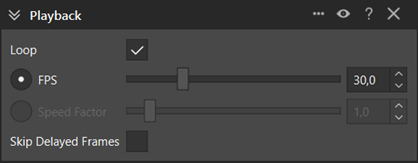
No timestamps: only FPS controls playback; Speed Factor is inactive.
Regular (equidistant) timestamps Timestamps are valid and regular: the time differences between consecutive frames do not differ by more than 5% from each other. Both
Frames per secondandSpeed factorare available and stay in sync (changing one updates the other). The software infers an original frame rate from the timestamps.

Regular timestamps: FPS and Speed factor stay in sync (30.0 → 73.8 → 104.9 FPS corresponds to 1.0 → 2.5 → 3.5 speed factor).
Irregular timestamps Timestamps are valid but the gaps between consecutive frames vary by more than 5%. Both
Frames per secondandSpeed factorare available but act independently (no automatic conversion between them).

Irregular timestamps: FPS and Speed factor are independent and only one of them can be active each time. The images show that only one control is active at a time; changing one does not update the other.
Definition of regular timestamps (for reference): Consecutive timestamp differences must not differ from each other by more than 5%. In other words, if the intervals between frames are roughly constant within that tolerance, timestamps are treated as regular (equidistant).
Input
SharedImageSet: replays the image set as an image stream.
TrackedSharedImageSet: replays images and associated tracking as a combined image stream with a tracking substream.
TrackingSequence (one or more): replays only tracking data as a tracking stream.
Output
For image input: a Playback Stream (image stream, and tracking stream if the input was a TrackedSharedImageSet).
For tracking-only input: a Playback Stream that is a tracking stream.
The playback stream appears in the data widget and can be used like any other stream. Playback is controlled via the standard stream controls (Play/Pause, focus, etc.) in the selection widget and via the playback algorithm controller.
Playback controller
The algorithm controller provides:
Loop: when enabled, playback restarts from the beginning when it reaches the end.Frames per second/Speed factor: control playback speed (see the three modes above; speed factor is only active when timestamps are valid).Skip delayed frames: when enabled, frames that would be shown too late are skipped so playback stays close to the requested rate.