Selection Widget
The Selection Widget is located in the left sidebar of the ImFusion Suite below the Views Widget. It enables you to alter the selection of elements in datasets which support it such as image sets, tracking sequences, and anatomical structure sets.
Concept
For datasets that consist of multiple elements, the selection widget allows you to change the set of selected elements, as well as the currently focused element. The focused element is typically the sole element that is rendered and/or is rendered prominently in the views.
Some algorithms operate on the set of selected elements or the focused element. You can also extract the selected elements into a new dataset via Right-click the dataset in the Data Widget .
Some datasets also support playback functionality, e.g. image/volume sets and video streams. In this case, the selection widget also provides playback controls to play through the elements of the dataset.
Target Datasets
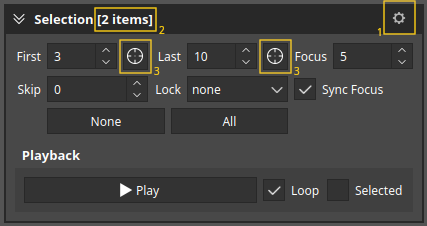
By default the selection widget affects the currently visible dataset(s) in the data widget (cf. Data Widget). This can be changed via the gear button (1) to instead target the selected dataset(s).
The name of the dataset that is currently targeted by the selection widget is shown in the title bar (2). If more than one dataset is targeted, the title bar shows <N> items.
Controls
Selection
First: Controls the first element in the selection. The use current focus buttons (3) can be used to set it to the current focus.Last: Controls the last element in the selection. The use current focus buttons (3) can be used to set it to the current focus.Focus: Controls the focused element.Skip: Controls the number of skipped elements. E.g. a skip of 1 means that every second element is selected.Lock: Allows you to lock either the first or the last or both elements of the selection to the focus. E.g. when the first element is locked, the first element will follow as the focus changes.Sync Focus: When more than one dataset is targeted, this checkbox allows you to synchronize the focus between all targeted datasets.
Playback
Play/Pause: Starts/stops playback of the elements in the dataset.Loop: When enabled, playback will loop back to the beginning when reaching the end of the dataset.Selected: When enabled, the playback will only play through the selected elements of the dataset.