 |
ImFusion C++ SDK 4.5.0
|
|
ImFusion C++ SDK 4.5.0
|
The ImFusion library natively supports the 2D and 3D visualization of any number of images and geometric objects (e.g. meshes). Data is visualized inside a display containing one or multiple views. The size and location of the views is managed by a layout manager. This allows to easily add and remove views and to create side-by-side layouts for simultaneously working with multiple data sets without having to directly deal with layout issues. The actual rendering of the data is performed by OpenGL objects which are rendered by the views. Views are not limited to rendering only a single object but can also render multiple objects for instance allowing to blend multiple data sets in a registration scenario. To remain independent of the GUI-toolkit used to build the application, the visualization framework is consistently separated into a high-level GUI-dependent layer and a low-level OpenGL-based layer.
The top-most class in the visualization framework is DisplayWidgetMulti, which represents a display surface on which OpenGL can render. Among other things it provides methods for adding and removing views and managing the layout through an associated DisplayLayout object. A single view is represented by InteractiveView which is a high-level Qt-aware class. As such it can display context menus and deal with user input such as mouse events. Inside the interactive view is an associated GlView object which is responsible for setting up the OpenGL scene and rendering Data. Furthermore, a GlView renders GlObject instances, such GlAnnotations. User interaction is handled on the Qt GUI layer side by objects inheriting from Interaction. They can be attached to an InteractiveView and translate user input to calls on the underlying GlView. Several pre-defined Interaction objects exist allowing to quickly add support for standard 2D- and 3D interactions such as pan, zoom and rotate.
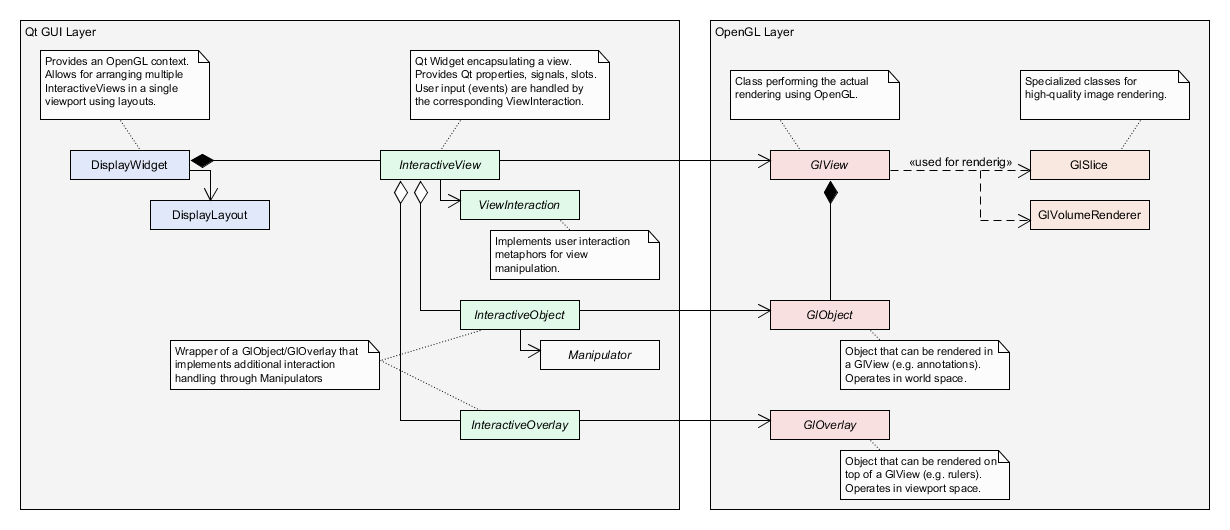
InteractiveViews can also contain multiple InteractiveObject objects. They are responsible for rendering graphical primitives directly in world space. Such primitives are for instance MPR intersection lines of other views or annotations such as splines. For annotations there exists the dedicated base-class InteractiveAnnotation. InteractiveObjects contain a GlObject object which is responsible for performing the actual rendering. For annotations a dedicated base-class GlAnnotation is available. User input for these objects is handled by Manipulator objects which are associated with the InteractiveObject and operate in a similar fashion to the Interaction objects by translating user-input to calls on the associated GlObject. There exist several pre-defined manipulators for dealing with basic geometric primitives and meshes. A convenience class Interactive allows for easy access to the contained OpenGL class, e.g. Interactive<GlSpline> represents a spline object whose control points can be manipulated.
Finally, InteractiveViews can also hold multiple InteractiveOverlay objects. In contrast to InteractiveObjects, InteractiveOverlay reside in viewport space and are always rendered on top of the view. Examples are the text overlay, button overlays, as well as the orientation overlay. Same as with all other parts of the view architecture InteractiveOverlays also have an OpenGL counterpart: the GlOverlay that takes care of the actual rendering process.
For 2D and MPR visualization, the following classes collaborate in order to get the final rendering result:
For 3D visualization, the following classes collaborate in order to get the final rendering result:
The configuration of the visualization is split into two main levels: The per-view configuration and the per-data configuration.
The view configuration level defines the general appearance of the given view but not the individual appearance of the shown data. The view configuration consists of
InteractiveView::setVisibleData().InteractiveView::addObject().InteractiveView::addOverlay().For backwards-compatibility, the view classes also provide some getters/setters to setup data-specific display configuration. Please note, that a view does not store this information but only forwards the calls to the corresponding DisplayOptions object (the one of the first shown image) and therefore the usage of these methods is considered deprecated.
Since a single view can display multiple images/objects at the same time, an additional per-data configuration layer is needed. This data display configuration is based on the DataComponent API and implemented in the DisplayOption2d class for 2D/MPR views and DisplayOptions3d class for 3D views. In order to configure the visualization for a specific image, you request the corresponding DisplayOptions object and configure that one:
Member functions such as InteractiveView::setVisibleData() accept any Data type as input. Due to the extensible nature of the SDK not all views can necessarily display every data type. You can query compatibility through the InteractiveView::acceptsData() interface. The DataDisplayHandler interface enables you to add support for custom Data types. Therefore, you implement a specialization and register it with the DataDisplayHandlerFactory. The default implementation of an InteractiveView will query all registered DataDisplayHandlers if they can handle a given Data type for a given view. The SDK provides a couple of default handlers for its essential Data types such as SharedImageSet or ImageStream.
Topics | |
| Interactions | |
| User interaction with views and overlays. | |
| 2D Visualization | |
| Tools and classes for 2D visualization. | |
| 3D Visualization | |
| Tools and classes for 3D visualization. | |
| Annotations | |
| Augmenting visualizations with annotations. | |
Classes | |
| class | ImFusion::GlImageIntensifierAngleOverlay |
| Text overlay representing the current view's matrix in the form of image intensifier angles, for instance "RAO -3.3, CAU -51.5". More... | |
| class | ImFusion::GlObject |
| Abstract base class for an renderable OpenGL object that can be hosted in a GlView. More... | |
| class | ImFusion::GlOverlay |
| Abstract base class for OpenGL overlays. More... | |
| class | ImFusion::GlPlotView |
| View for plotting data. More... | |
| class | ImFusion::GlView |
| Base class for implementing OpenGL views. More... | |
| class | ImFusion::RendererFactory |
| Static factory class to manage registered slice and volume renderers to be used in views. More... | |
| class | ImFusion::DataDisplayHandlerFactory |
| Factory class to maintain the list of registered DataDisplayHandlers ,. More... | |
| class | ImFusion::DataDisplayHandler |
| Interface to generically show/hide Data in a GUI::View and/or query visibility. More... | |
| class | ImFusion::DisplayWidget |
| Render surface that hosts InteractiveViews and will call their render method on repaints. More... | |
| class | ImFusion::DisplayWidgetMulti |
| Specialized version of DisplayWidget that manages specific views and provides an automatic layout. More... | |
| class | ImFusion::GlPlotLegend |
| Display legend of a plot view as an overlay Color and marker styles replicate the plot style, however, in the text form instead of graphic renders. More... | |
| class | ImFusion::Interactive< T, S > |
| Strongly typed templated version of an InteractiveObject. More... | |
| class | ImFusion::InteractiveObject |
| Wraps a GlObject pairing it with an optional Manipulator in order to attach it to an InteractiveView. More... | |
| class | ImFusion::InteractiveOverlay |
| Wraps a GlOverlay in order to display it at specific positions in an InteractiveView. More... | |
| class | ImFusion::InteractiveView |
| Abstract base class for a view that can be hosted by a DisplayWidget. More... | |
| class | ImFusion::PlotView |
| View for plotting data. More... | |
| class | ImFusion::SharedImageSetDisplayHandler |
| Shows regular SharedImageSet instances (no derivatives) in ImageView2D and ImageView3D. More... | |
| class | ImFusion::StereoSharedImageSetController |
| Shows regular StereoSharedImageSet instances (no derivatives) in ImageView2D. More... | |
| class | ImFusion::StereoImageStreamDataController |
| Data Controller for StereoImageStream. More... | |