ImFusion C++ SDK 4.4.0

Data structures and interfaces for working with image data. More...

Collaboration diagram for Images:

Detailed Description

Data structures and interfaces for working with image data.

Overview

Images are one of the most essential data structure for medical imaging. The ImFusion SDK provides different levels of abstractions for working with them. All images can be 2D, 3D, or 4D (3D+t) and stored on different backends such as the main memory or the GPU. The following class diagram provides an overview how the different classes relate to each other:
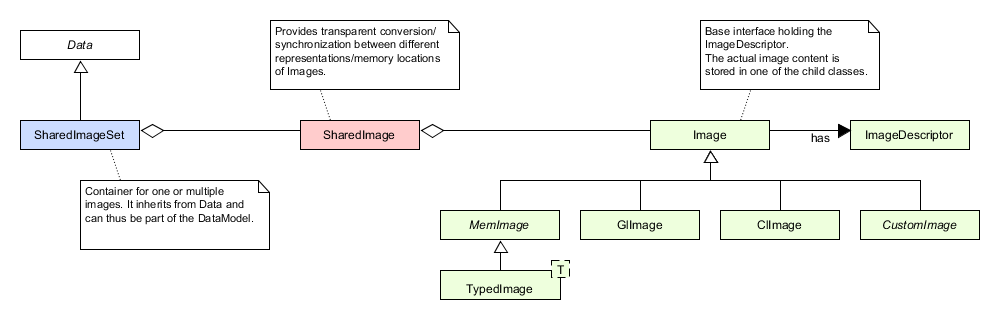
Overview class diagram of the ImFusion image data API.
  • The ImageDescriptor class serves as record to describe the essential properties of an image such as its dimensions or spacing but does not store any pixel data. Also, it does not store ny information about its relation to world coordinates because it does only refer to a single image by itself. Use ImageDescriptorWorld if you need an image descriptor with a non-identity world pose.
  • Image is the base interface for all image classes that store pixel data. It holds an ImageDescriptor as member but the actual pixel data storage is to be implemented by deriving classes (image representations):
    • MemImage is an abstract class deriving from Image and represents an image located in main memory. Its interface is type-agnostic and often used to pass image data around on the main memory where you don't care about the exact underlying pixel type.
    • TypedImage<T> derives from MemImage and is templated with the actual pixel type T. It provides you with type-safe access to the pixel data.
    • GlImage is a specialization of Image to store image data on the GPU using a OpenGL texture. It has functionality for using the image in OpenGL code and for uploading and downloading it from and to main memory.
    • ClImage serves as specialization to store the image data on the GPU using an OpenCL buffer or image object. It has functionality for using the image in OpenCL code and for uploading and downloading it from and to main memory.
    • CustomImage is an abstract interface for custom image representations that are not natively supported by the ImFusion SDK. It enables you to use a custom storage backend for the pixel data while still making use of the automatic and transparent synchronization between Image types provided be the high-level classes below.
  • SharedImage is a wrapper class to hold multiple representations/types of the same semantic Image and automatically synchronize them when needed. For instance, you can create a SharedImage with a MemImage and then request a different representation (e.g. a GlImage) and it will take care of providing it for you. When changing the pixel data of one image type inside you must mark it as "dirty" so that SharedImage can keep the other representations up-to-date. Furthermore, it annotates the base Image interface with an optional transformation matrix for placing the image in the world coordinate system, as well as an optional mask or deformation.
  • Finally, the SharedImageSet class aggregates one or many SharedImages and combines them with a Selection object. It also implements the Data interface so that you can place them inside the DataModel and use them as input/output for Algorithms.

Coordinate Systems

When dealing with images we distinguish three coordinate systems:

  • Pixel Coordinates where one unit corresponds to one pixel in the image.
  • Image Coordinates where one unit corresponds to one millimeter as described in the image spacing.
  • World Coordinates that allow for registering multiple images in the same space.

See Coordinate Systems for an in-depth discussion how they relate to each other.

Image Processing

Naturally, our SDK provides a wide range of image processing algorithms. For instance, fast low-level CPU implementations for basic operations such as cropping, thresholding, or resampling can be found in the ImageProcessing namespace. More high-level implementations that can also leverage the computing power of GPUs can be found for instance in the BasicImageProcessing algorithm or in the ImageResamplingAlgorithm.

Tutorial

Refer to the Image Data Tutorial for concrete code examples illustrating the usage of the image API.

Namespaces

namespace  ImFusion::ImageProcessing
 Low-level algorithms for image processing.

Classes

class  ImFusion::CustomImage
 Base interface for custom Image types that can be converted from/to MemImages and are supported by SharedImage. More...
class  ImFusion::Image
 Base class and interface for images. More...
struct  ImFusion::ImageDescriptor
 Struct describing the essential properties of an image. More...
class  ImFusion::ImageDescriptorWorld
 Convenience struct extending an ImageDescriptor to also include a matrix describing the image orientation in world coordinates. More...
class  ImFusion::MemImage
 Abstract base class for an image residing in main memory. More...
class  ImFusion::TypedImage< T >
 Concrete implementation of a MemImage for a given pixel type. More...
class  ImFusion::GlImage
 OpenGL texture image. More...
class  ImFusion::SharedImage
 Image shared on multiple devices. More...
class  ImFusion::SharedImageSet
 Set of images independent of their storage location. More...
class  ImFusion::TrackedSharedImageSet
 Set of images with arbitrarily sampled tracking data. More...
class  ImFusion::ClImage
 OpenCL image class. More...
class  ImFusion::US::UltrasoundSweep
 Set of 2D ultrasound images constituting a 3D (freehand) ultrasound sweep, so a clip of 2D ultrasound images with arbitrarily sampled tracking data and additional ultrasound-specific metadata. More...

Functions

template<typename F, typename... Args>
auto ImFusion::Utils::typeSwitch (Image::Type itype, F &&func, Args &&... args)
 Function for internally type switching a given lambda function on the Image::Type cases.
template<typename F, typename... Args>
auto ImFusion::Utils::typeSwitch (const MemImage &img, F &&func, Args &&... args)
 Function for internally type switching a given lambda function on the Image::Type cases.
template<typename F, typename... Args>
auto ImFusion::Utils::typeSwitch (const PixelType &type, F &&func, Args &&... args)

Function Documentation

◆ typeSwitch() [1/3]

template<typename F, typename... Args>
auto ImFusion::Utils::typeSwitch ( Image::Type itype,
F && func,
Args &&... args )

#include <ImFusion/Base/Utils/TypeSwitcher.h>

Function for internally type switching a given lambda function on the Image::Type cases.

The lambda function shall take the objects it needs to act on by capture, and have a single parameter of type auto. The switcher then passes to the lambda all the types associated with the Image::Type cases via the detail::TypeWrapper struct. In this way in the lambda body the user can retrieve the wrapped type by calling decltype on the lambda param.

Note
The Image::Type::HFLOAT case is handled as float.

Example: the following (typical) code

MemImage* MemImage::create(unsigned int type, int width, int height, int slices, int channels, void* data, bool own)
{
MemImage* img = nullptr;
switch (type)
{
case BYTE: img = TypedImage<char>::create(type, width, height, slices, channels, (char*)data, own); break;
case UBYTE: img = TypedImage<unsigned char>::create(type, width, height, slices, channels, (unsigned char*)data, own); break;
case SHORT: img = TypedImage<short>::create(type, width, height, slices, channels, (short*)data, own); break;
case USHORT: img = TypedImage<unsigned short>::create(type, width, height, slices, channels, (unsigned short*)data, own); break;
case INT: img = TypedImage<int>::create(type, width, height, slices, channels, (int*)data, own); break;
case UINT: img = TypedImage<unsigned int>::create(type, width, height, slices, channels, (unsigned int*)data, own); break;
case HFLOAT:
case FLOAT: img = TypedImage<float>::create(type, width, height, slices, channels, (float*)data, own); break;
case DOUBLE: img = TypedImage<double>::create(type, width, height, slices, channels, (double*)data, own); break;
}
return img;
}
Abstract base class for an image residing in main memory.
Definition MemImage.h:20
static std::unique_ptr< MemImage > create(const ImageDescriptor &descriptor)
Factory method to instantiate a MemImage from an ImageDescriptor.
static std::unique_ptr< TypedImage< T > > create(const ImageDescriptor &descriptor, T *data=nullptr, Ownership own=Ownership::NotOwning)
Factory method to create a new TypedImage from an ImageDescriptor.

can be replaced with the following code:

MemImage* MemImage::create(unsigned int type, int width, int height, int slices, int channels, void* data, bool own)
{
auto func = [](auto wrapper, unsigned int type, int width, int height, int slices, int channels, void* data, bool own) -> MemImage* {
using T = typename decltype(wrapper)::type;
return TypedImage<T>::create(type, width, height, slices, channels, static_cast<T*>(data), own);
};
return Utils::typeSwitch(static_cast<Image::Type>(type), func, type, width, height, slices, channels, data, own);
}
Type
Pixel/voxel data type, equivalent to OpenGL defines.
Definition Image.h:35
auto typeSwitch(Image::Type itype, F &&func, Args &&... args)
Function for internally type switching a given lambda function on the Image::Type cases.
Definition TypeSwitcher.h:70

◆ typeSwitch() [2/3]

template<typename F, typename... Args>
auto ImFusion::Utils::typeSwitch ( const MemImage & img,
F && func,
Args &&... args )

#include <ImFusion/Base/Utils/TypeSwitcher.h>

Function for internally type switching a given lambda function on the Image::Type cases.

The lambda function shall take the objects it needs to act on by capture, and have a single parameter of type auto. The switcher then passes to the lambda all the types associated with the Image::Type cases via the detail::TypeWrapper struct. In this way in the lambda body the user can retrieve the wrapped type by calling decltype on the lambda param.

Note
The Image::Type::HFLOAT case is handled as float.

Example: the following (typical) code

{
switch (type)
{
case BYTE: return createGrayscale<T>(static_cast<const TypedImage<char>&>(input));
case UBYTE: return createGrayscale<T>(static_cast<const TypedImage<unsigned char>&>(input));
case SHORT: return createGrayscale<T>(static_cast<const TypedImage<short>&>(input));
case USHORT: return createGrayscale<T>(static_cast<const TypedImage<unsigned short>&>(input));
case INT: return createGrayscale<T>(static_cast<const TypedImage<int>&>(input));
case UINT: return createGrayscale<T>(static_cast<const TypedImage<unsigned int>&>(input));
case HFLOAT:
case FLOAT: return createGrayscale<T>(static_cast<const TypedImage<float>&>(input));
case DOUBLE: return createGrayscale<T>(static_cast<const TypedImage<double>&>(input));
}
return nullptr;
}
Concrete implementation of a MemImage for a given pixel type.
Definition TypedImage.h:28
std::unique_ptr< TypedImage< T > > createGrayscale(const TypedImage< T > &input, int numChannels=-1, ColorWeighting method=ColorWeighting::Average)
Create a single-channel version of the input image by averaging pixel values over the first N (or all...

can be replaced with the following code:

{
auto func = [&](auto wrapper) -> std::unique_ptr<MemImage> {
using T = typename decltype(wrapper)::type;
return createGrayscale<T>(static_cast<const TypedImage<T>&>(input));
};
return Utils::typeSwitch(input, func);
}

◆ typeSwitch() [3/3]

template<typename F, typename... Args>
auto ImFusion::Utils::typeSwitch ( const PixelType & type,
F && func,
Args &&... args )

#include <ImFusion/Base/Utils/TypeSwitcher.h>

Search Tab / S to search, Esc to close