 |
ImFusion C++ SDK 4.5.0
|
|
ImFusion C++ SDK 4.5.0
|
Storage and hierarchical organization of datasets. More...
Storage and hierarchical organization of datasets.
One of the central interfaces of the ImFusion SDK is Data. It serves as input and output of Algorithms and is therefore supposed to be used as base class for all entities representing a self-contained piece of information, such as images or meshes.
The DataModel class is intended to be used as a central storage container for your datasets. It takes ownership of all Data intances inside and enables you to organize them in a hierarchical fashion leveraging the DataGroup class. Therefore, it is also part of every ApplicationController.
The DataModel takes also care of managing DataLinks: They provides the functionality to keep specific aspects of Data (e.g. windowing information, world pose) in sync across multiple instances.
To facilitate visualizing and interacting with a DataModel in a Qt you should use the DataItemModel wrapper class that transforms it into a QAbstractItemModel to be used in any Qt view or directly in our off-the-shelf DataWidget.
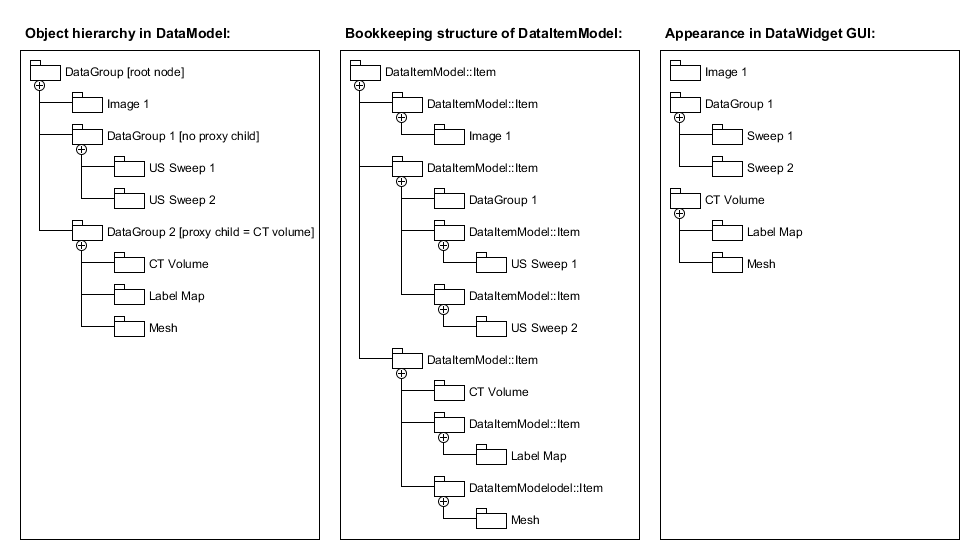
When passing one ore multiple datasets around most interfaces of the ImFusion SDK use the DataList or OwningDataList class as container. They are convenience wrappers for a std::vector<Data*> or a std::vector<std::unique_ptr<Data>>, respectively. Technically, these classes are interchangeable with the correspoding std::vector types. However, they provide useful helper functions for searching or filtering of datasets and maintain the basic invariant that they do not contain any duplicate datasets or nullptrs.
Classes | |
| class | ImFusion::Mesh |
| Represents a triangle mesh. More... | |
| class | ImFusion::CompoundData |
| Interface for datasets that are formed by one or multiple other nested Data instances. More... | |
| class | ImFusion::Data |
| Virtual base class for representing data from which all concrete data class such as images need to derive. More... | |
| class | ImFusion::DataGroup |
| Data element that groups multiple Data instances together in a hierarchical fashion. More... | |
| class | ImFusion::DataLink |
| Interface for linking properties between multiple Data instances. More... | |
| class | ImFusion::DataList |
| Container for any number of Data instances such as image or meshes. More... | |
| class | ImFusion::DataModel |
| Container for datasets holding ownership and managing a hierarchical list of persistent data. More... | |
| class | ImFusion::DataModelAutoLinking |
| Utility class to automatically create DataLink instances between datasets in a DataModel. More... | |
| class | ImFusion::OwningDataList |
| Wrapper class to store a list of owned Data instances. More... | |
| class | ImFusion::PointCloud |
| Data structure for point clouds. More... | |
| class | ImFusion::TrackingSequence |
| Sequence of rigid tracking data with optional timestamps, quality values and flags. More... | |
| class | ImFusion::Tree |
| Data structure for trees. More... | |
| class | ImFusion::DataLogger |
| Support for logging data. More... | |
| class | ImFusion::SharedImageSet |
| Set of images independent of their storage location. More... | |
| class | ImFusion::DataDisplayModel |
| This class extends a DataItemModel with data visibility information from a DisplayWidgetMulti. More... | |
| class | ImFusion::DataFilterModel |
| The DataFilterModel class is a proxy model to filter a DataItemModel. More... | |
| class | ImFusion::DataGroupingModel |
| QAbstractProxyModel implementation that groups data in a source-model according to a specified GroupingOption. More... | |
| class | ImFusion::DataItemModel |
| Wrapper class to transform the DataModel into a QAbstractItemModel so that it can be used in Qt views. More... | |
| class | ImFusion::DataWidget |
| Graphical user interface for the DataModel/DataItemModel. More... | |
| class | ImFusion::Stream |
| Base class representing a stream of changing data in the DataModel. More... | |