 |
ImFusion C++ SDK 4.5.0
|
|
ImFusion C++ SDK 4.5.0
|
Network communication functionality. More...
Network communication functionality.
This component provides an easy-to-use abstraction for network communication, eliminating the need to manage protocol details.
Message handling is built upon our Signal infrastructure and supports the transmission of std::string and ByteBuffer over Websocket, TCP, and UDP. Incoming and outgoing messages are processed asynchronously on separate threads, enabling non-blocking operation. This requires that signal callbacks must be handled properly, as they can originate from arbitrary threads.
The ImFusion Network infrastructure facilitates the sending and receiving of messages or data between devices.
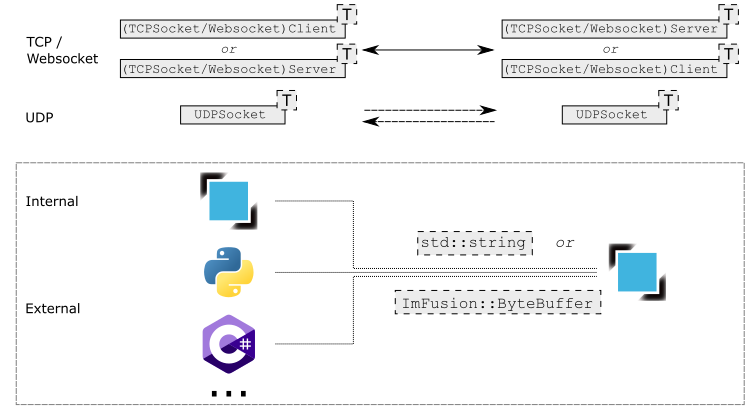
For simple message exchange (raw text, json, xml, etc.), the default message type std::string should be used, where the underlying memory representation is sent, and received bytes are interpreted in the same manner. It is recommended to use UTF-8 encoding with the same locale on both ends to prevent misinterpretation. If a direct text representation is not available, exchanging raw bytes via ByteBuffer is preferred. For data exchange, utility functions are provided to serialize Data objects into a ByteBuffer and deserialize a ByteBuffer back into Data, enabling seamless communication (see Data serialization).
Communication within the ImFusion framework is straightforward, utilizing either a client-server pair (TCP or WebSocket) or a symmetric UDP socket. For a client-server architecture, one or more WebsocketClient or TCPSocketClient instances can connect to a corresponding WebsocketServer or TCPSocketServer (see example for WebSocket below). Alternatively, a symmetric approach can be used with the connection-free UDP protocol via the UDPSocket class, though this method does not guarantee delivery due to potential packet loss.
Example of a Websocket connection:
Websocket/TCP/UDP communication is not restricted to the ImFusion framework. Any external peer can exchange information with ImFusion network communication classes, provided they implement the corresponding protocol. In such cases, the programmer is responsible for correctly interpreting the received bytes on both ends. Beyond the typical use case of communication between two computers within a local network, this approach can also serve as a simple method for exchanging data between programs running on the same machine (localhost mode).
To facilitate integration, the ImFusion example repository includes code samples demonstrating data exchange with other programming languages:
 Python example: Code
 C# example: Code
We provide utility functions for generic data serialization. The serialization function Serialization::dataToByteBuffer and deserialization function Serialization::dataFromByteBuffer utilize ImFusionFile serialization functions internally. Consequently, any Data object for which the ImFusionFilePlugin interface is implemented, including custom Data implementations, can be serialized and deserialized.
Namespaces | |
| namespace | ImFusion::Network |
| Namespace for network communication bundled in the subfolder 'Stream/Network'. | |
Classes | |
| class | ImFusion::Network::ClientConnectionBase< Payload > |
| Base class providing an interface for client communication. More... | |
| class | ImFusion::Network::ConnectionBase |
| Abstract non-templated base class for all connection types. More... | |
| class | ImFusion::Network::TypedConnectionBase< Payload > |
| Templated base class providing an interface for client-server communication (e.g., WebSocket, TCP) or peer-to-peer communication (e.g., UDP). More... | |
| struct | ImFusion::Network::ConnectionBlueprint< Payload > |
| Defines the necessary information for registering a new connection type. More... | |
| class | ImFusion::Network::ConnectionFactory< Payload > |
| The ConnectionFactory manages available connection protocols and creates new connections based on the provided configuration. More... | |
| class | ImFusion::Network::ConnectionLatencyMeasuringAlgorithm |
| Measure the delay (latency) experienced in transmitting data with the corresponding protocol, where the transmission data is represented as std::string, and the each message is defined as[TIMESTAMP]:time_in_ms,[ID]:message_id. More... | |
| class | ImFusion::Network::ServerConnectionBase< Payload > |
| Abstract base class providing a server interface. More... | |
| class | ImFusion::Network::TCPSocketClient< Payload > |
| TCP socket client implementation providing bidirectional communication. More... | |
| class | ImFusion::Network::TCPSocketServer< Payload > |
| TCP socket server implementation providing bidirectional communication. More... | |
| class | ImFusion::Network::UDPSocket< Payload > |
| UDP socket implementation for network communication. More... | |
| class | ImFusion::Network::WebsocketClient< Payload > |
| WebSocket client implementation providing bidirectional communication. More... | |
| class | ImFusion::Network::WebsocketServer< Payload > |
| Websocket server implementation providing bidirectional communication. More... | |
Typedefs | |
| using | ImFusion::Network::ConnectionProtocol = std::string |
| Alias representing the connection protocol type, used to identify connections registered with the ConnectionFactory. | |
#include <ImFusion/Stream/Network/ConnectionFactory.h>
Alias representing the connection protocol type, used to identify connections registered with the ConnectionFactory.
Built-in protocols include: "Websocket Client", "Websocket Server", "TCP Socket Client", "TCP Socket Server", and "UDP Socket".