
Manipulating Images#
Notebook bootstrap#
import sys
from pathlib import Path

shared_dir = next(path / "shared" for path in [Path.cwd(), *Path.cwd().parents] if (path / "shared").is_dir())
if str(shared_dir) not in sys.path:
    sys.path.append(str(shared_dir))

from demo_utils import unzip_folder, mpr_plot
Import Modules#
import imfusion
import numpy as np
from copy import deepcopy
Image geometry#
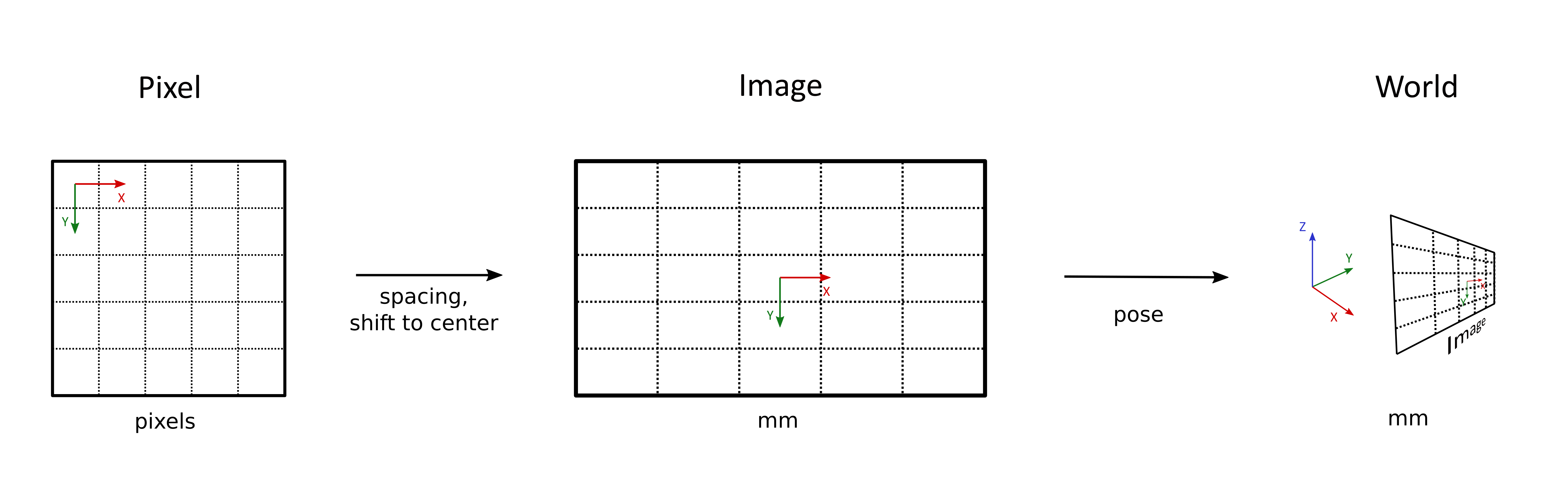
A SharedImage defines the orientation and size of an image using three coordinate systems:
Pixel Space: The discrete voxel grid, where voxels are indexed by: (
iin[0, Width],jin[0, Height],kin[0, Slices]).Image Space: The voxel grid expressed in metric units (mm), with the image center located at the origin:
O = (x, y, z) = (0, 0, 0). The voxel size is defined by the imagespacing. Image coordinates range from(-SizeX/2, -SizeY/2, -SizeZ/2)to(SizeX/2, SizeY/2, SizeZ/2).World Space: The physical coordinate system. Each
SharedImagestores a transformation matrix that defines the image’s orientation and position by mapping image-space coordinates to world-space coordinates.
unzipped_folder = unzip_folder("../shared/data/pet-ct-rtstruct.zip")

pet_sis, *_ = imfusion.io.load('../shared/data/pet-ct-rtstruct/pet.imf')
pet_image = pet_sis[0]

np.set_printoptions(suppress=True)

print('Image matrix:\n', pet_image.world_to_image_matrix)
print('Image spacing:', pet_image.descriptor.spacing)
print('Image dimensions:', pet_image.descriptor.dimensions)
print('Image extent:', pet_image.descriptor.extent)
print('Image coordinate of Voxel (0, 0, 0)', pet_image.descriptor.pixel_to_image([0, 0, 0]))
print('Voxel coordinate of Image Center (0., 0., 0.)', pet_image.descriptor.image_to_pixel([0., 0., 0.]))

# get world coordinates of Voxel (0, 0, 0):
print(f'World coordinate (aka Position) of Voxel (0, 0, 0): {pet_image.descriptor_world.pixel_to_world([0, 0, 0])}')
print(f'World coordinate of Image Center (0., 0., 0.): {np.matmul(pet_image.descriptor_world.matrix_to_world, np.array([0., 0., 0., 1.]))}')
Image matrix:
 [[  1.          -0.           0.           0.00001776]
 [  0.           1.          -0.           0.00001776]
 [ -0.           0.           1.         414.51000977]
 [  0.          -0.          -0.           1.        ]]
Image spacing: Spacing(x=3.6458332538605, y=3.6458332538605, z=3.270000086421467)
Image dimensions: [192 192 227]
Image extent: [699.99998474 699.99998474 742.29001962]
Image coordinate of Voxel (0, 0, 0) [-348.17707574 -348.17707574 -369.51000977]
Voxel coordinate of Image Center (0., 0., 0.) [ 95.5  95.5 113. ]
World coordinate (aka Position) of Voxel (0, 0, 0): [-348.17709351 -348.17709351 -784.02001953]
World coordinate of Image Center (0., 0., 0.): [  -0.00001776   -0.00001776 -414.51000977    1.        ]
Basic image processing#
Many ImFusion SDK algorithms are available as free functions in imfusion.processing. This tutorial uses image resampling as an example, but you can explore imfusion.processing to discover the full range of available Python algorithms.
NOTE: Algorithms without a dedicated Python function can still be executed through the generic
imfusion.algorithm.execute(...)orimfusion.algorithm.create(...)interface.
For example, the following code resamples the image to a spacing of 2 mm in each dimension. The corresponding geometry information stored in the SharedImage is updated automatically. The optional arguments are shown with their default values and control how the resampling is performed.
print("before:\t", pet_sis[0].descriptor)

resampled_pet = imfusion.processing.resample_to_spacing(
    pet_sis,
    target_spacing=[2., 2., 2.],  # mm
    # reduction_mode=imfusion.ReductionMode.AVERAGE,  # Defines how contributing input voxels are combined.
    # interpolation_mode=imfusion.InterpolationMode.LINEAR,  # Defines how values are sampled between voxel centers.
    # keep_zero_values=False,  # Controls whether zero-valued input voxels remain zero after resampling.
    # preserve_extent=False,  # Controls whether output spacing is adjusted to preserve the input extent.
    # device_policy=imfusion.processing.DevicePolicy.PREFER_GPU,  # Selects the preferred processing device.
    # mode=imfusion.processing.Mode.CREATE_NEW,  # Selects whether processing modifies the input or creates a new image.
)

imfusion.io.save([resampled_pet], 'output/resampled_pet.imf')

print("after:\t", resampled_pet[0].descriptor)
before:	 imfusion.BoundImageDescriptor(dimensions: [w:192, h:192, s:227, c:1] | spacing:[3.64583, 3.64583, 3.27] | isMetric:true | type:FLOAT | memory: 31.92 MB)
after:	 imfusion.BoundImageDescriptor(dimensions: [w:350, h:350, s:371, c:1] | spacing:[2, 2, 2] | isMetric:true | type:FLOAT | memory: 173.4 MB)
Since SharedImages store orientation and spacing information, they can also be resampled to the geometry of another reference image.
(ct_sis,) = imfusion.io.load('../shared/data/pet-ct-rtstruct/ct_base.imf')

print(f'original CT: {ct_sis[0].descriptor}\n')

resampled_ct = imfusion.processing.resample_to_ref_image(ct_sis, resampled_pet)

imfusion.io.save([resampled_ct], 'output/resampled_ct.imf')


print(f'CT: {resampled_ct[0].descriptor}')
print(f'PET: {resampled_pet[0].descriptor}')
original CT: imfusion.BoundImageDescriptor(dimensions: [w:167, h:167, s:247, c:1] | spacing:[3, 3, 3] | type:INT | memory: 26.28 MB)

CT: imfusion.BoundImageDescriptor(dimensions: [w:350, h:350, s:371, c:1] | spacing:[2, 2, 2] | isMetric:true | type:INT | memory: 173.4 MB)
PET: imfusion.BoundImageDescriptor(dimensions: [w:350, h:350, s:371, c:1] | spacing:[2, 2, 2] | isMetric:true | type:FLOAT | memory: 173.4 MB)