
Working with Images#
In this tutorial, we’ll provide an overview of the concepts and classes that
represent medical images in the imfusion-sdk and how to work with them.
Notebook bootstrap#
import sys
from pathlib import Path

shared_dir = next(path / "shared" for path in [Path.cwd(), *Path.cwd().parents] if (path / "shared").is_dir())
if str(shared_dir) not in sys.path:
    sys.path.append(str(shared_dir))

from demo_utils import unzip_folder, mpr_plot
Import modules#
import imfusion
import numpy as np
from matplotlib import pyplot as plt
from ipywidgets import IntSlider, FloatSlider, interact, fixed
Image classes#
SharedImage: class holding a single image, either a 2D image (X-Ray, Ultrasound) or a 3D volume (CT, NM, MR, …). The word “Shared” refers to the fact that it can have multiple representations on different devices (typically CPU + GPU via OpenGL), which are kept automatically in sync.SharedImageSet: a set ofSharedImages. This is the main entry point of any method in the ImFusion SDK that operates on image data. For volumetric data, aSharedImageSetmostly comprises a singleSharedImagerepresenting a volume (i.e., a CT), but it is fundamental for holding image series consisting of multiple frames, which have no trivial 3D representation, i.e., an ultrasound acquisition, an OCT pullback, Fluoro navigation, 4D-CT, and so on.ImageDescriptor: class describing the basic properties of an image, like its storage type (int, float, …), its spacing, and its shape.Matrix: orientation of the image data in the physical world.
Loading Images#
Since ImFusion files (.imf) can contain multiple
SharedImageSets, loading an.imffile returns a list ofSharedImageSetobjects.A
SharedImageSetitself also behaves like a Python sequence, meaning you can iterate over it or access individual images by index.
unzipped_folder = unzip_folder("../shared/data/pet-ct-rtstruct.zip")

pet, *_ = imfusion.io.load('../shared/data/pet-ct-rtstruct/pet.imf')
labels, *_ = imfusion.io.load('../shared/data/pet-ct-rtstruct/tumors.imf')

print('PET: ', pet)
print('Labels: ', labels)

# Each of the loaded SharedImageSets contains one image.
print(f'Num of images in PET: {len(pet)}, num of images in Labels: {len(labels)}')

# Get the SharedImage from the SharedImageSet.
image = pet[0]
print('SharedImage:', image)
PET:  imfusion.SharedImageSet(size: 1, [imfusion.SharedImage(FLOAT width: 192 height: 192 slices: 227 spacing: 3.64583x3.64583x3.27 mm)])
Labels:  imfusion.SharedImageSet(size: 1, [imfusion.SharedImage(UBYTE width: 192 height: 192 slices: 227 spacing: 3.64583x3.64583x3.27 mm)])
Num of images in PET: 1, num of images in Labels: 1
SharedImage: imfusion.SharedImage(FLOAT width: 192 height: 192 slices: 227 spacing: 3.64583x3.64583x3.27 mm)
interact(
    mpr_plot,
    image=fixed(image),
    labels=fixed(labels[0]),
    x=IntSlider(112, 0, 191),
    y=IntSlider(104, 0, 191),
    z=IntSlider(195, 0, 226),
    vmin=IntSlider(4000, 0, 40000, 100),
    vmax=IntSlider(36000, 0, 40000, 100),
    label_alpha=FloatSlider(0.7, min=0.0, max=1.0, step=0.1),
    bake_transformation=fixed(False),
    continuous_update=False
)
None
The ImageDescriptor describes the properties of an image.
In addition, each SharedImage stores information about the image’s modality.
print(image.descriptor, '\n')
print(image.modality)
print(labels[0].modality)
imfusion.BoundImageDescriptor(dimensions: [w:192, h:192, s:227, c:1] | spacing:[3.64583, 3.64583, 3.27] | isMetric:true | type:FLOAT | memory: 31.92 MB)

Modality.NM
Modality.LABEL
Accessing image data with numpy#
SharedImage and SharedImageSet provide seamless interoperability with NumPy. Images can be converted to and from numpy.ndarray objects using the standard NumPy interface.
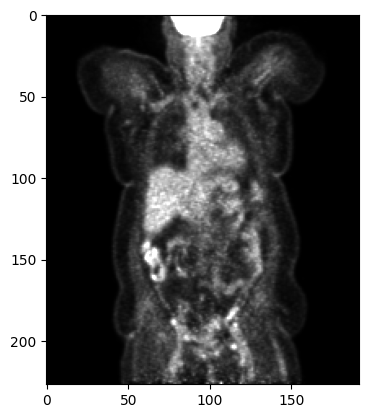
A SharedImage is represented as a NumPy array whose dimensions correspond to (slices, height, width, channels).
Note: Leading dimensions of size 1 are omitted, while the channel dimension is always retained.
pet_image = pet[0]
array = np.array(pet_image, copy=True)
print(pet_image.shape)

# select one slice for plotting
plt.imshow(array[::-1, 95, :, :], cmap='gray', vmin=0, vmax=15000)
plt.show()
Shape(slices=227, height=192, width=192, channels=1)
Since a SharedImageSet is essentially a list of SharedImages, it has an additional leading dimension:
(frames, slices, height, width, channels).
array_set = np.array(pet, copy=False)
print(array_set.shape)
(1, 227, 192, 192, 1)
Modifying image data#
np.array(image, copy=True)creates a copy. Changes to that array are not reflected in theSharedImage.np.array(image, copy=False)creates a view of the image data, when possible. Changes to that array are reflected in theSharedImage.To update a
SharedImagefrom a copied array, useassign_array()to copy the modified data back into the image.
Note: You cannot resize or reshape the image in this way, nor change the type of the image. In such cases, create a new
SharedImagefrom the modified NumPy array.
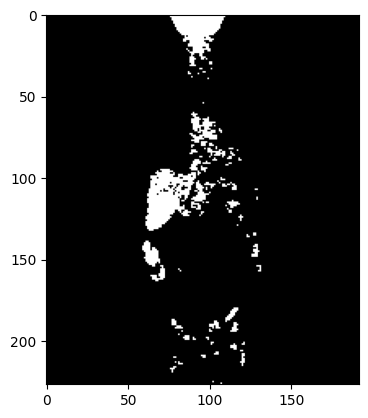
# Create mask by thresholding
pet_image = pet.clone()[0]
array = np.array(pet_image, copy=False)

threshold = 10000
array[array < threshold] = 0
array[array >= threshold] = 1000

plt.imshow(array[::-1, 95, :, :], cmap='gray')
plt.show()
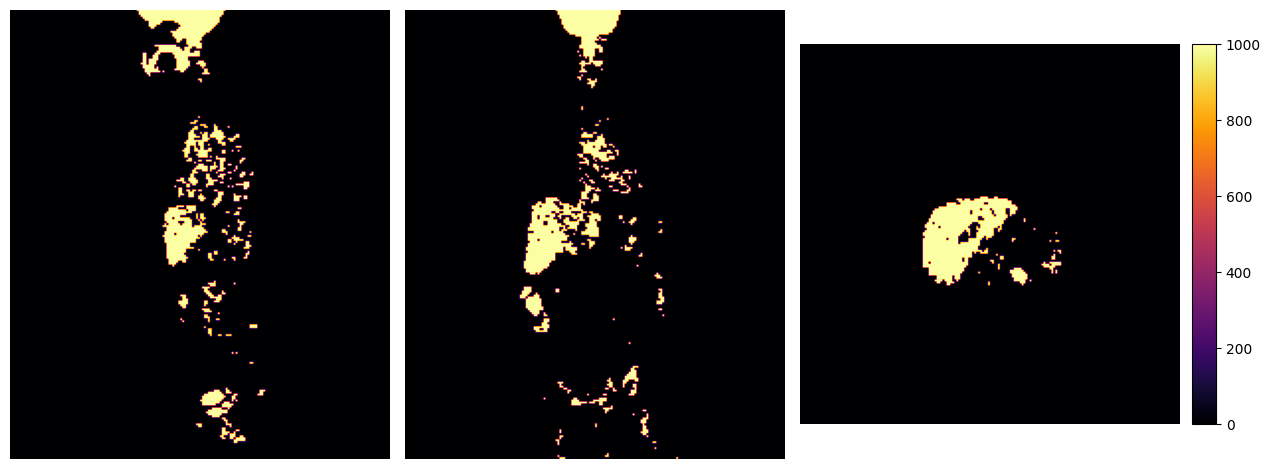
pet_image.assign_array(array)
mpr_plot(pet_image)
Saving Images#
A list of SharedImageSets can be saved to disk and visualized in the ImFusion Suite.
# The generic `imfusion.io.save` function saves data to ImFusion (`.imf`) files.
imfusion.io.save([imfusion.SharedImageSet(pet_image)], "output/thresholded_pet.imf")